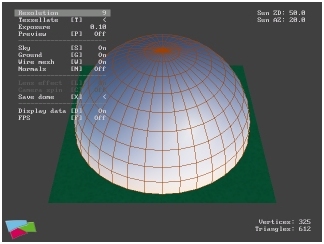
Editor features
This RenderWare 3.1 application may be used to generate a geometrical
model of a skydome using realistic clear-sky colors. The algorithm used
to calculate physically-based sky colors was developed by Preetham et
al [1], which is the result of a large-scale simulation of the multiple-scattering
of sunlight in the Earth's atmosphere as seen by an observer on the surface
of the Earth. The results of this simulation were then condensed into an
analytical form with three main dependencies: (a) the position of the Sun
in the sky, (b) the direction in the sky the observer is looking, and (c)
the turbidity of the atmosphere (a measure of the prevailing haziness of
the air). In analytical form the algorithm is very fast to evaluate and
is used here in real-time to calculate the sky color at each vertex of
the skydome, leaving the Gouraud shading to 'fill' in the rest.
The application can be interacted with in the following principal
ways
Edit the skydome by changing the number of vertices and triangles defining
the dome's geometry. The greater the number of triangles the better the
visual result. Use the 'wire mesh' mode to visualize how finely the skydome
has been tessellated.
-----
Edit the position of the Sun on the skydome using the mouse. This can
done in real-time, though be prepared for a slight delay if the skydome
geometry has been highly tessellated! Each time the Sun is moved the colors
of the whole skydome have to be recalculated. Best results will be obtained
if the position of the Sun coincides with a skydome vertex.
-----
Preview the appearance of the skydome as it would be seen if saved
and imported into another 'practical' application. In this mode the camera
is placed at the center of the skydome, which can then be pointed in any
direction to observe any part of the sky. A lens-flare effect has been
added for camera views directed towards the Sun, both for realism and as
an aid to pin-point the position of the Sun in the sky (not always obvious
due to the discrete nature of the geometry).
-----
Edit the exposure value used to render each frame. The exposure is
introduced to provide a quick 'n' dirty way of transforming the real-world
color values produced by the algorithm to RGB colors for display on a monitor
screen.
Reference
[1] Preetham A J, Shirley P, and Smits B, A Practical Analytic Model
for Daylight, Proceedings of SIGGRAPH 1999. In Computer Graphics
Proceedings, Annual Conference Series, 1999, ACM SIGGRAPH, pp. 91-100.
Try it out yourself
Use this link to download a zip file [494 KB]
containing Win32 executables for D3D7 and OpenGL together with some C-source
code. Only application side source code files are provided. Recommended
minimum hardware configuration: PIII 600MHz, nVidia GeForce2 GTS. |